I have not been blogging for years, but still been pondering a lot with technology so why no try to share some stuff again. Last years I have played a lot with Proxmox and buldling my own home lab setup. This blog is hosted on this lab so both performance and availability might suffer :P But that is a whole other topic for another day.
On to the topic of the day. I had a need to do proper alerting for my backup jobs. I first started sending emails every day of the current backup status, but this got very noisy quickly. And also, if the emails are missing one day, would I notice? As humans noticing a negative alarm (the absence of an alarm or status) is very hard. So enter Uptime Kuma!
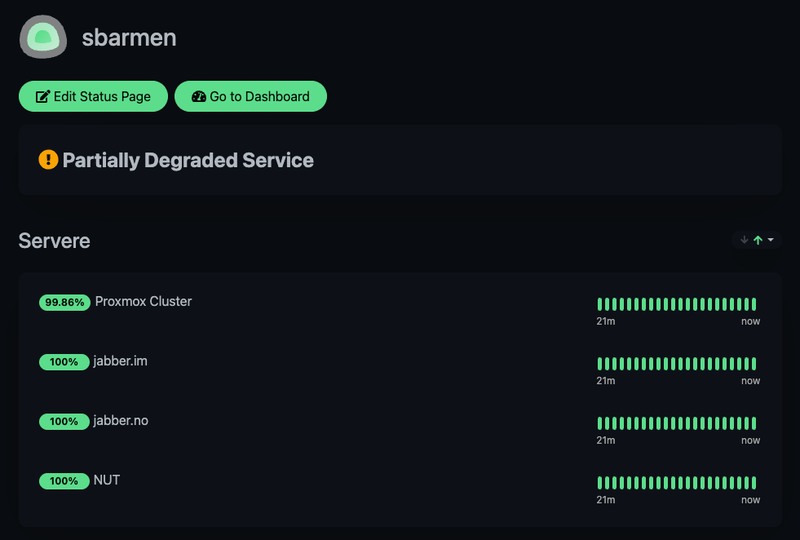
I am hosting Uptime Kuma (UK) on Google Cloud (again - topic for another day perhaps) on a debian instance. Wherever you host UK you need to have access from your Proxmox VE (PVE) nodes to the UK instance since we will send status from Proxmox to UK.
Short architecture intro#
I have selected to make one monitor per PVE host that sends a status to UK. You could opt for a clusterwide solution, but this is my current setup. Each node has a hook script that is kicked off during the backup using vzdump. Basically this will say “backup-started”, “backup-completed” or “backup-failed”. I achieve this with a wireguard tunnel connected to my homelab network.
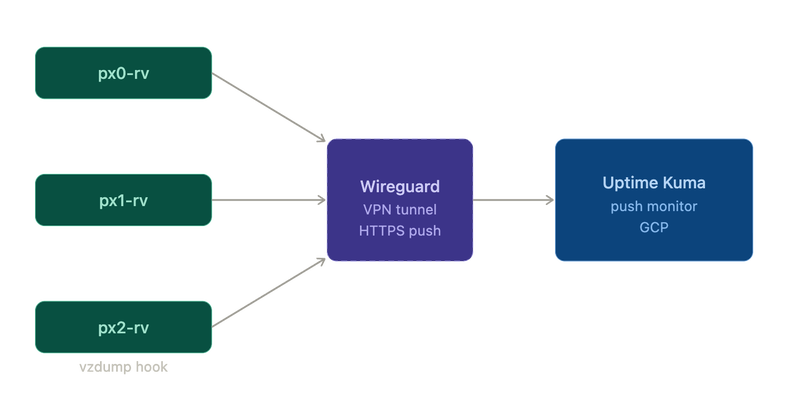
Basic architecture is as described above, and it works on these three principals:
- Backup started = green light (all ok!)
- Backup completed (without errors) = green light (all ok!)
- Backup failed / completed with errors = red light
- Heartbeat - not heard from XX in the last 86400 seconds = orange light
- Retry interval - still not heard from XX for a further 7200 seconds = red light
Set up sensors on Uptime Kuma#
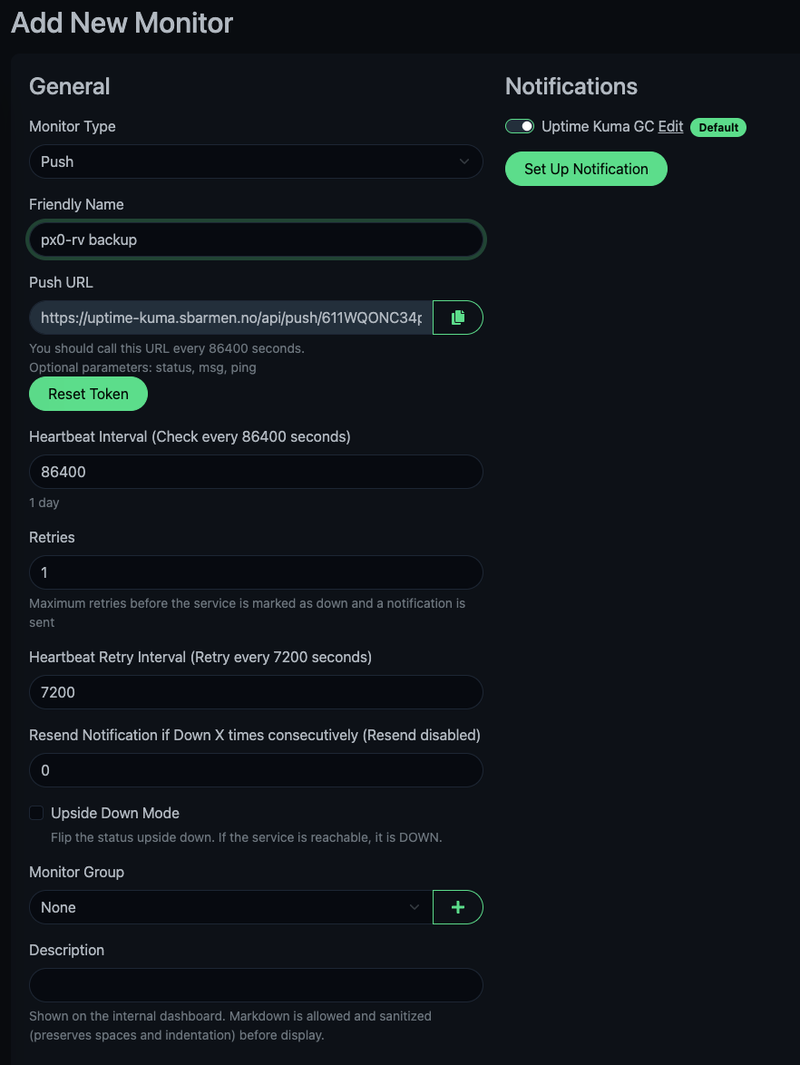
Click the “Add New Monitor” and set up a push sensor with something like the above. You tune the heartbeat interval with regards to your backup frequency, retries is the yellow light (the heartbeat is delayed) and the monitor group is optional for your dashboard organization. Make sure you copy your push url for the script below, but delete the last part (everything from ?).
Example:#
The copy button on UK gives you this URL:
https://uptime-kuma.fqdn.com/api/push/EdM6ivQc7Lz55HsnDmUH7IxxGDSqyCbI?status=up&msg=OK&ping=Keep only this:
https://uptime-kuma.fqdn.com/api/push/EdM6ivQc7Lz55HsnDmUH7IxxGDSqyCbIIf you have set up Notifications, enable that (you should!). I use Signal for this purpose, again, a topic for another day (I should make a list!).
Proxmox VE Hook Script#
On the Proxmox side we need to create a hook script that checks the proxmox log files for errors and sends a status to UK. The easiest way to do this is to use vzdump, as that negates the need to get credentials for the Proxmox API.
Lets put the script in usr/local/bin/backup-hook.sh and give it the execute permission.
nano /usr/local/bin/backup-hook.shWrite up a script similar to this, and make sure you at a minimum replace the URL under KUMA_PUSH_URL that you got from the step above:
#!/bin/bash
# ── EDIT THIS ─────────────────────────────────────────────────────────────────
# The push URL you copied from your Uptime Kuma push monitor:
KUMA_PUSH_URL="https://uptime-kuma.fqdn.com/api/push/yoursecretkey"

# ── OPTIONAL TUNING ───────────────────────────────────────────────────────────
LOG_TAIL_LINES=10        # how many error lines to keep per guest
MAX_MSG_CHARS=900        # cap the message so the push URL stays short

# ── NO NEED TO EDIT BELOW THIS LINE ───────────────────────────────────────────
# vzdump calls hook scripts with a cleared environment, so PATH must be set here
export PATH=/usr/local/sbin:/usr/local/bin:/usr/sbin:/usr/bin:/sbin:/bin

ERRORS_FILE="/run/vzdump-kuma-errors"    # error detail collected from guest logs
FAILED_FILE="/run/vzdump-kuma-failed"    # fallback when there is no log (PBS)

PHASE="$1"    # job-start, log-end, job-end ...
MODE="$2"     # stop / suspend / snapshot, guest-level phases only
VMID="$3"     # vmid, guest-level phases only

# Sends one status to Uptime Kuma.
#   $1 = "up" or "down" - this is the only thing that turns the monitor
#        green or red, the message below is just text shown next to it
#   $2 = the message
#
#   The rest of the curl options to make sure we do not get errors from strange
#   characters in the log, also increase timeouts etc.
push() {
    local status="$1"
    local message="${2:0:$MAX_MSG_CHARS}"    # first N characters only

    curl --get --fail --silent --show-error \
         --max-time 15 --retry 2 \
         --data-urlencode "status=${status}" \
         --data-urlencode "msg=${message}" \
         "$KUMA_PUSH_URL" > /dev/null || true
}

case "$PHASE" in
    job-init|job-start)                  # start of job, reset the state files
        : > "$ERRORS_FILE"; : > "$FAILED_FILE"
        [[ "$PHASE" == "job-start" ]] && push up "Backup job started"
        ;;

    backup-abort)                        # this guest failed
        echo "VM ${VMID} (${HOSTNAME:-unknown})" >> "$FAILED_FILE"
        ;;

    log-end)                             # only phase where LOGFILE is set
        if [[ -f "${LOGFILE:-}" ]] && grep -qE '^ERROR:|^INFO: Failed at' "$LOGFILE"; then
            detail=$(grep -E '^ERROR:|^INFO: Failed at' "$LOGFILE" \
                     | tail -n "$LOG_TAIL_LINES" | tr '\n' ' ')
            echo "VM ${VMID}: ${detail}" >> "$ERRORS_FILE"
            sed -i "/^VM ${VMID} /d" "$FAILED_FILE" 2>/dev/null   # drop the duplicate
        fi
        ;;

    job-end)                             # runs even when single guests failed
        detail=$(cat "$ERRORS_FILE" "$FAILED_FILE" 2>/dev/null | tr '\n' ' ')
        if [[ -n "$detail" ]]; then
            push down "Backup finished with errors - ${detail}"
        elif [[ -f "$ERRORS_FILE" ]]; then
            push up "All backups completed OK"
        else
            push down "No job state - hook never saw job-start"
        fi
        rm -f "$ERRORS_FILE" "$FAILED_FILE"
        ;;

    job-abort)                           # fatal job error
        push down "Backup job aborted - $(cat "$ERRORS_FILE" "$FAILED_FILE" 2>/dev/null | tr '\n' ' ')"
        rm -f "$ERRORS_FILE" "$FAILED_FILE"
        ;;
esac

exit 0    # a non-zero exit makes vzdump fail the backup job
Give it execute permissions:
chmod +x /usr/local/bin/backup-hook.shNow we need to hook this script into vzdump. This will make sure proxmox invokes the script automatically on backup events. This is quite easy, just open /etc/vzdump.conf and add or change the line with “script:” and change it to “script: /usr/local/bin/backup-hook.sh”.
nano /etc/vzdump.confMake sure it looks something like this:
....
#prune-backups: keep-INTERVAL=N[,...]
script: /usr/local/bin/backup-hook.sh
#exclude-path: PATHLIST
....
After this we know the script will kick off whenever vzdump is ran and then it will push back to UK on all events. Make sure these steps are carried out on all your proxmox cluster nodes.
How does vzdump work#
Proxmox invokes your hook script multiple times during a backup job, executing it as a standard system binary or shell script. Every time Proxmox reaches a new phase in the backup process, it calls the script and passes information using positional command-line arguments ($1, $2, $3) and environment variables.
The phases come in two families. The job-level phases run once per backup job and get no extra arguments:
- job-init
- job-start
- job-end
- job-abort
The guest-level phases run once per VM or container, and here $2 is the backup mode (stop / suspend / snapshot) and $3 is the vmid:
- backup-start
- backup-end
- backup-abort
- log-end
- pre-stop
- pre-restart
- post-restart
vzdump also sets a handful of environment variables, and this is where it gets a little tricky, because they are not available in every phase:
| Variable | Available in |
|---|---|
STOREID | all phases (empty if you back up with –dumpdir) |
DUMPDIR | all phases (empty for PBS storages) |
VMTYPE, HOSTNAME | guest-level phases only |
TARGET | backup-end only |
LOGFILE | log-end only, and empty for PBS storages |
The full list is documented in the pve-manager repo here: vzdump-hook-script.
My first attempt only used the job-level phases, which looks like the obvious choice, but it does not actually work. Two gotchas. First, job-abort only fires if the whole job dies. If a single VM fails, the job still finishes with job-end, so job-abort alone will never catch a failed guest.
So the script uses both families. backup-abort notes which guest failed, and log-end reads that guest’s log and picks out the ERROR: lines. Both are collected in a file under /run, and job-end then sends one single status to UK: down if anything was collected, up if the file is empty. job-init and job-start reset the files so nothing leaks over from the previous run.
Two last details that are easy to miss. vzdump calls the hook with a cleared environment, so there is no PATH unless you set it yourself. And if the hook exits non-zero, vzdump treats the backup as failed - so the script ends with exit 0. Monitoring should never be able to break the thing it is monitoring.
Testing#
If all is correct you should now get a status in UK every time a backup starts, ends or aborts in Proxmox. Rather than waiting for tonight’s job, test the script by hand. Be aware that these tests push to your real monitor, so it will go red on purpose - just run a clean start/end afterwards to get it green again.
Start with the happy path. The phases have to be run in the same order vzdump would call them, because job-end reads the state file that job-start creates:
/usr/local/bin/backup-hook.sh job-start
/usr/local/bin/backup-hook.sh job-end
That should give you “Backup job started” followed by “All backups completed OK” in UK. Running job-end on its own reports “No job state”, that is intentional and tells you the hook missed the start of the job.
Then simulate a failed guest. backup-abort is the phase vzdump calls when a single VM fails:
/usr/local/bin/backup-hook.sh job-start
/usr/local/bin/backup-hook.sh backup-abort snapshot 101
/usr/local/bin/backup-hook.sh job-end
Now the monitor should go yellow with “Backup finished with errors - VM 101”.
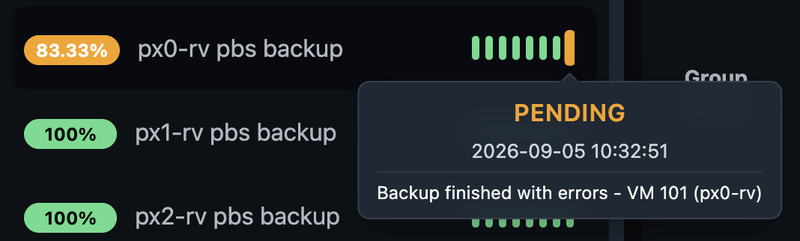
To test the log parsing as well, point LOGFILE at one of the .log files sitting next to your backups in the dump directory, ideally one from a job that actually failed:
LOGFILE=/var/lib/vz/dump/vzdump-qemu-101-2026_09_05-02_00_01.log \
    /usr/local/bin/backup-hook.sh log-end snapshot 101
If something does not behave as expected, run the same commands with bash -x in front:
bash -x /usr/local/bin/backup-hook.sh job-endThe benefit of using -x is that you will get to see all the steps carried out by the bash script and it makes it easier to see where it fails, if you have trouble.
Finally, test it end to end on a single guest without waiting for the scheduled job. This takes a real backup, so pick a small one:
vzdump 101 --script /usr/local/bin/backup-hook.shIf all goes well you now have a simple dashboard to alert you if your backup fails, this way you only have to act on events, not look for events missing.
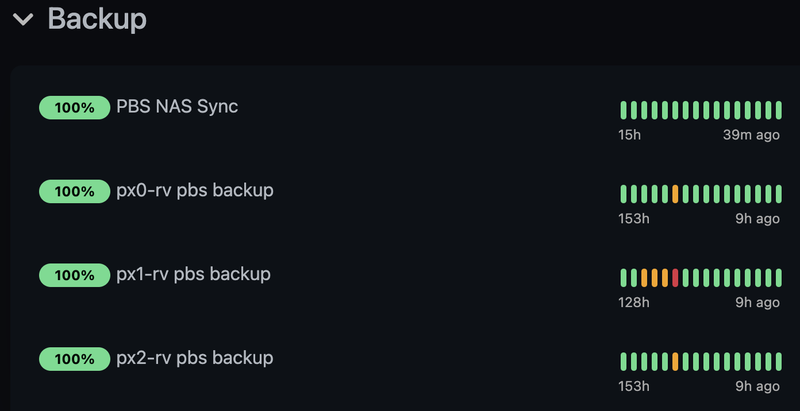
This is one example of an alert I will get on Signal:
Conclusion#
Setting up Uptime Kuma and getting alerts only when something needs attention is a game changer. Now I only get alerted when something needs my attention, not every day in a summary email that I never read.
AI disclosure The hook script was drafted with the help of Claude (Anthropic). I specified the behaviour, reviewed the code, made some adjustments and refinements and then tested it against real vzdump runs on my own cluster before putting it into production. Verify it in your own environment before relying on it.